

What is crawl budget in SEO? It is the number of URLs Googlebot can and wants to crawl on your website within a given window of time, a definition Google formalized in its crawling documentation. For most small sites, crawl budget is invisible. For large ecommerce catalogs, news publishers, and enterprise platforms, it decides whether new pages and product updates ever reach the index.
This guide covers how Google defines crawl budget, who needs to worry about it, what wastes it, and the optimization playbook the Upraise SEO agency uses at scale.
What Is Crawl Budget in SEO?
Crawl budget in simple terms
Think of Googlebot as a delivery driver with a fixed number of stops per day. Each stop is one URL fetch. The driver wants the addresses most likely to have fresh, popular parcels.
- Crawl budget = the URLs Google can and wants to crawl on your site.
- It is a per-site ceiling, not a per-page allowance.
- It fluctuates daily based on server health, content freshness, and incoming signals.
How Google defines crawl budget
According to the Google Search Central crawl budget guide, the definition combines crawl capacity limit and crawl demand: “Taking crawl capacity and crawl demand together, Google defines a site’s crawl budget as the set of URLs that Google can and wants to crawl.”
Is crawl budget a fixed number?
No. crawl budget is not fixed and can fluctuate based on changes in crawl capacity, content updates, site size, and shifts in user demand. Server improvements alone do not raise it permanently, and broken server responses can reduce it within hours.
Is crawl budget the same as crawl rate?
No. Crawl rate is the speed at which Googlebot makes requests to your server, measured in requests per second. Crawl budget is the total set of URLs Google decides to fetch over a period. Crawl rate is a throughput number; crawl budget is a selection number.
Is crawl budget the same as indexing budget?
No. Crawling and indexing are separate stages. A URL can be crawled and still never be indexed if it is filtered out by canonicalization, robots rules, noindex tags, or quality signals. Crawl budget governs the discovery side; indexing is governed by a separate, much larger pipeline.
How Does Crawl Budget Work?
Crawl capacity limit
Crawl capacity limit is the upper bound on simultaneous connections and fetch rate Googlebot can sustain without degrading user experience.
- Server response time and time-to-first-byte (TTFB).
- Connection pool availability and DNS resolution speed.
- Error rates, particularly 5xx and timeout responses.
- Site architecture depth.
Crawl demand
Crawl demand reflects how much Google wants to crawl your URLs. It rises for popular or fresh URLs.
The relationship between crawl capacity and crawl demand
If capacity is high but demand is low, Google crawls less than the ceiling. If demand is high but capacity is constrained, it throttles.
Why improving server health does not automatically produce rankings
Better server response times help Googlebot crawl more URLs, but they do not make those URLs rank. Understanding how do search engines work makes this distinction clearer: search engines crawl pages, process and index their content, then evaluate factors such as relevance, quality, and links when determining rankings. Faster servers help Google access your pages efficiently; they do not make those pages more relevant or valuable.
What Is Crawl Rate Limit?
Crawl rate vs crawl budget
Crawl rate is a per-second measure of Googlebot server requests. Crawl budget is the broader ceiling across time.
How server performance affects crawl rate
Slow responses signal a poor user experience, so Google lowers request rates.
Why slow servers can reduce crawling
When Googlebot detects slow requests, it widens the time between them, fewer URLs get fetched.
What happens when Googlebot encounters 5xx errors
5xx errors tell Googlebot your server is unhealthy. It backs off and lowers request rates.
What happens during connection timeouts
Timeouts suggest the server is unreachable. Googlebot throttles aggressively, and recurring timeouts can collapse crawl capacity in a day.
What Is Crawl Demand?
URL popularity and importance
URLs with external links, internal links from authoritative pages, or significant traffic are treated as more popular.
Content freshness
Frequently updated pages (news, stock tickers, product availability) signal that they need frequent revisits.
Website scale
Larger sites generate more crawl demand but also raise the bar for prioritization.
New and updated URLs
Whenever a URL is new or substantially changed, crawl demand spikes.
Why not every URL deserves the same crawl attention
Crawl budget optimization aligns crawl attention with business priority, not equal treatment.
Does Every Website Need to Worry About Crawl Budget?
Most websites do not. For the ones that do, ignoring crawl budget costs real revenue.
Small websites
Sites under a few hundred URLs rarely hit crawl ceilings.
Medium websites
Sites with thousands of URLs begin to feel crawl constraints. Watch for important pages taking unusually long to appear in the index.
Large websites
Sites with hundreds of thousands of URLs operate in crawl-budget territory by default.
Frequently updated websites
Publishers, aggregators, and SaaS apps with constantly changing data have elevated crawl demand.
Ecommerce websites with faceted navigation
Faceted navigation lets shoppers filter products by attributes such as size, color, brand, and price. Combining multiple filters can generate thousands or even millions of URL variations from a catalog with only 50,000 products, increasing crawl demand and potentially wasting crawl capacity on low-value URLs.
.
News and publishing websites
News sites need near-instant crawling to remain competitive.
Websites with large numbers of Discovered – currently not indexed URLs
High “Discovered – currently not indexed” counts in Google Search Console are the most direct evidence of a crawl budget problem.
Crawl Budget vs Crawling vs Indexing vs Ranking
- Crawling: Googlebot fetches a URL.
- Indexing: Google processes and stores the content.
- Ranking: Google decides where indexed pages appear.
- Crawl budget: The ceiling on URLs Google will fetch.
A page can be crawled but not indexed. It can be indexed but not rank. Crawl budget only addresses the first stage.
What Can Waste Crawl Budget?
Duplicate URLs
Duplicate content across multiple URLs forces Googlebot to crawl the same content more than once. Canonicalization, 301 redirects, and parameter handling are the standard fixes.
URL parameters
Tracking parameters (utm_source, session IDs, sort orders) multiply URL counts without adding unique value.
Faceted navigation
Filter combinations can explode URL counts. A 10,000-product catalog can generate millions of faceted URLs.
Endless filter combinations
Filter combinations that lead to empty result pages are the worst offenders. Each fetch is pure waste.
Redirect chains
A redirect chain forces Googlebot to follow multiple hops before reaching the final URL.
Redirect loops
Redirect loops are worse than chains. Googlebot eventually stops fetching them.
Soft 404s
Soft 404s return a 200 status code but display a “not found” message. Googlebot indexes them and wastes crawl budget.
Server errors
Persistent 5xx errors tell Google your server is unreliable. Crawl budget drops with it.
Orphan pages
Orphan pages have no internal links pointing to them. Many never get crawled.
Low-value archives
Date-based archives, tag combinations, and author archives often have thin content. They pull budget from revenue pages.
Tag pages
Tag pages frequently duplicate category and post content. They are usually worth deindexing.
Internal search-result URLs
Internal site search results are a classic crawl trap. Googlebot can crawl thousands of them.
Session and tracking URL variants
Session IDs in URLs create a unique URL per visitor. Googlebot can crawl millions of these over time.
Automatically generated thin pages
Templated city + service pages can scale to tens of thousands of thin URLs competing for crawl attention.
Poor internal linking
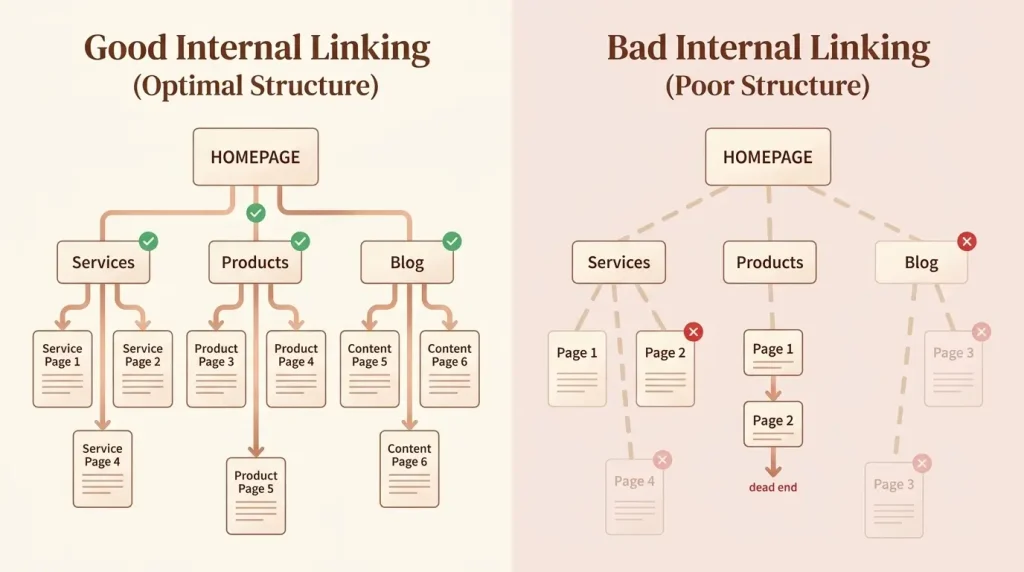
Poor internal linking can limit how efficiently search engines discover and understand important pages. Pages with few or no relevant internal links may receive less crawl attention and weaker contextual signals. Link to important pages from relevant, authoritative pages using descriptive anchor text.
How to Check Your Crawl Budget in Google Search Console
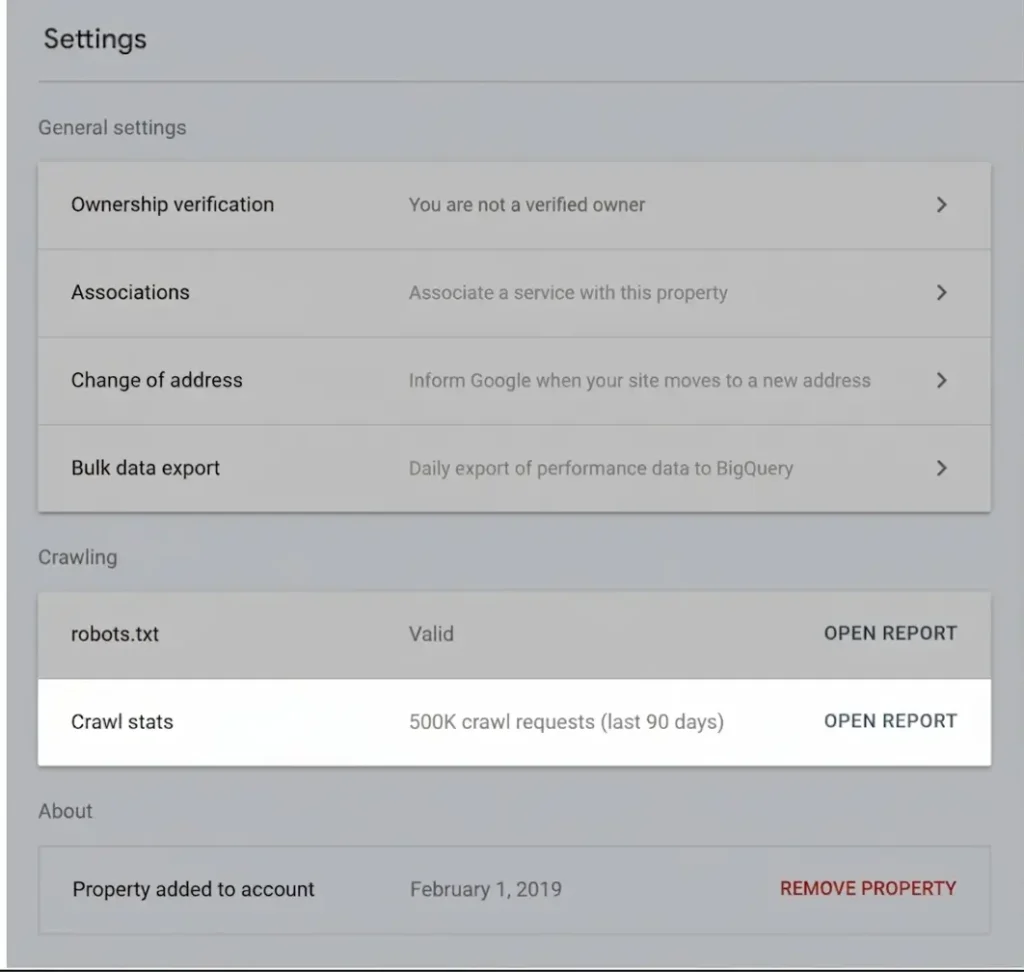
Google Search Console’s Settings report contains a crawl stats section showing how often Googlebot crawls your site.
Open your property, go to Settings > Crawl stats, then review Total crawl requests,
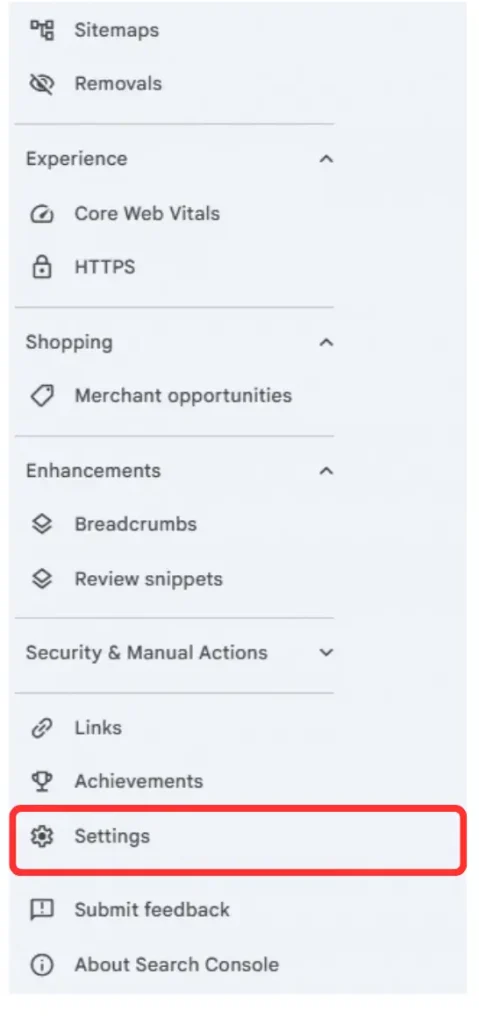
Crawl stats
Crawl response time, and Crawled pages per day.
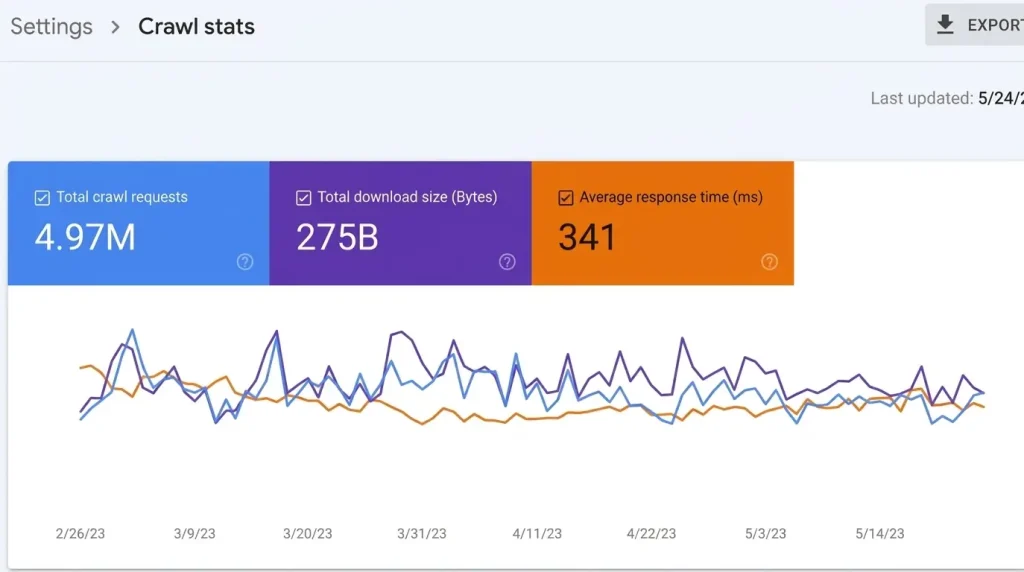
Compare the trend over 90 days to detect drops or spikes, and cross-reference crawl dates with content updates. The report does not give you a single “budget” number; it shows actual behavior.
How to Diagnose a Crawl Budget Problem
Signs of genuine crawl inefficiency
- Large numbers of “Discovered – currently not indexed” URLs.
- Critical pages taking weeks to appear in the index.
- Important pages dropping out of the index after refreshes.
- Server logs showing Googlebot spending time on low-value URLs.
- Crawl stats showing declining total requests.
Symptoms that are NOT necessarily crawl-budget problems
- Your site has fewer than 1,000 URLs.
- Pages are indexed but not ranking (a quality or relevance issue).
- Pages are crawled but not indexed (a canonicalization issue).
- Index coverage dropped after a migration (a redirect or sitemap issue).
How to Optimize Crawl Budget for SEO
- Improve server response times.
- Eliminate duplicate content with canonical tags.
- Use robots.txt and noindex to remove low-value URLs.
- Maintain a clean XML sitemap.
- Strengthen internal linking.
- Audit faceted navigation and block non-essential parameters.
- Run log file analysis.
Robots.txt vs Noindex for Crawl Budget
- robots.txt disallow: prevents Googlebot from fetching the URL. Use for admin, internal search, or staging URLs.
- noindex meta tag: allows crawling but instructs Google not to index the page.
If a URL is linked externally and you do not want it indexed, noindex is safer than robots.txt disallow.
How XML Sitemaps Help Crawl Efficiency
XML sitemaps do not raise your crawl budget. They direct it.
- Include only 200-status, indexable URLs.
- Exclude paginated, parameterized, and search-result URLs.
- Use lastmod accurately.
- Split large sitemaps by content type.
Internal Linking and Crawl Budget
Internal links are the primary signal Googlebot uses to discover new URLs.
- Link from authoritative pages to revenue-generating pages.
- Use descriptive anchor text.
- Build topic clusters.
- Keep pages within three clicks of the homepage.
Crawl Budget for Ecommerce Websites
Ecommerce is the highest-stakes arena for crawl budget. A 100,000-URL catalog can expand into millions of crawlable URLs without strict controls.
Faceted navigation
Block non-essential facet combinations from indexing. Indexable facets should be limited to combinations users actually search for.
Product filters
Filters producing empty or near-duplicate pages should be canonicalized to the parent category.
Sort parameters
Sort parameters (such as ?sort=price_asc) should always be canonicalized to the unsorted URL.
Product variants
Variants (size, color) should live on a single canonical product page, not separate URLs.
Out-of-stock URLs
Out-of-stock pages should remain crawlable with a clear signal that stock is temporarily unavailable.
Pagination
Paginated series should use self-referencing canonicals or a view-all page. Each paginated URL costs a fetch.
Search-result URLs
Internal search results must be blocked via robots.txt. They are the single largest source of wasted crawl.
Infinite combinations
Faceted navigation that can generate 50 million URL combinations is a crawl budget crisis by design.
Crawl Budget for JavaScript Websites
JavaScript-rendered sites add complexity. Googlebot crawls HTML first, then renders with a separate pipeline.
JavaScript-rendered URLs
URLs requiring JavaScript to render still get crawled, but rendering is queued behind crawling.
Client-side routing
Client-side frameworks (React Router, Vue Router) can create URL surfaces invisible to Googlebot.
API/XHR requests
Each rendered page may trigger multiple API/XHR requests. They affect rendering time.
Render cost vs crawl efficiency
A site that crawls efficiently but renders slowly is still losing. Render cost multiplies crawl cost.
Why rendering and crawling should not be conflated
They run on different infrastructure with different throttles. A page can be crawled but unrendered for hours.
SSR, static rendering and crawlability
Server-side rendering and static rendering deliver fully formed HTML on first response, the most crawl-efficient architecture for content-heavy sites.
Crawl Budget and International SEO
International SEO multiplies URL counts. Every language and country version is a separate URL surface.
hreflang URL discovery
Google discovers hreflang variants through internal links, sitemaps, and HTTP headers.
Country/language URL variants
ccTLDs, subdomains, and subdirectories each have their own crawl dynamics. Subdirectories inherit authority from the root domain.
Duplicate regional pages
Regional pages with only the city name changing create thin duplicate content.
International ecommerce URL parameters
Currency, language, and shipping-location parameters should be canonicalized to the appropriate regional root.
MENA and multilingual websites
MENA sites often serve Arabic, English, and French across multiple country subdomains.
How Arabic/English versions can increase URL complexity
MENA sites often have two to four times the URL count of a single-language equivalent.
Crawl Budget for Large Enterprise Websites
Enterprise SEO requires treating crawl budget as a first-class engineering constraint.
Millions of URLs
Enterprises routinely operate sites with millions of URLs. At that scale, crawl budget is the binding constraint.
Multiple subdomains
Subdomains for blogs, support, communities, and regions each consume their own crawl budget.
International site architecture
Global sites with 30+ country variants must coordinate hreflang, canonicalization, and crawl prioritization globally.
Product catalogs
Multi-million-SKU catalogs require faceted navigation systems designed for crawl efficiency from day one.
User-generated content
UGC surfaces (forums, reviews, Q&A) can grow unbounded. Aggressive noindex policies are essential.
Log-file analysis
Server log analysis is not optional at enterprise scale. It is the only way to see where Googlebot actually spends time.
Crawl segmentation
Segmentation by content type lets you allocate crawl budget explicitly.
Prioritize revenue-generating URLs
Revenue-generating URLs should always be the highest-priority crawl targets. Anything that competes needs justification.
Server Log Analysis for Crawl Budget
Server log files record every Googlebot request. They are the most accurate picture of crawl behavior: top-fetched URLs, wasted fetches, response times, crawl spikes, and orphan pages discovered via sitemaps.
Common Crawl Budget Myths
Crawl budget is one of the most misunderstood concepts in technical SEO. Google has published a dedicated myths about crawling page. Six myths deserve explicit correction:
- “Crawl budget is a fixed daily number.” False. It fluctuates with capacity, demand, and site changes.
- “Server improvements will raise my rankings.” False. Faster servers help Googlebot see pages; they do not change relevance.
- “nofollow prevents crawling.” False. nofollow only discourages crawling of linked URLs.
- “Small sites need crawl budget optimization.” Generally false.
- “Sitemaps raise crawl budget.” False. Sitemaps direct crawl attention.
- “Every page needs to be indexed.” False. Indexing thin pages dilutes crawl efficiency.
Related guides from Upraise seo agency
How to Improve Crawl Efficiency Without Chasing a Bigger Crawl Budget
Raising capacity is hard. Reducing waste is easier.
- Audit URL inventory and noindex low-value URLs.
- Consolidate duplicate content with canonical tags.
- Clean redirect chains and loops.
- Fix soft 404s.
- Block internal search results in robots.txt.
- Strengthen internal linking.
Crawl Budget Audit Checklist
- Pull 90 days of crawl stats from Google Search Console.
- Audit Page Indexing for “Discovered – currently not indexed” spikes.
- Export server log files.
- Identify the top 100 URLs by Googlebot fetches; classify by business value.
- Detect duplicate content and parameter inflation.
- Review robots.txt for unintended disallows.
- Validate XML sitemap against live canonical URLs.
- Check redirect chains longer than two hops.
- Audit internal search-result URLs.
- Identify orphan pages and add internal links.
- Document findings and prioritize fixes.
A Practical Crawl Budget Optimization Workflow
- Step 1 – Inventory: export every URL and classify by business value.
- Step 2 – Benchmark: pull 90 days of crawl stats and server logs.
- Step 3 – Diagnose: identify wasted fetches and orphaned content.
- Step 4 – Prioritize: rank fixes by revenue impact.
- Step 5 – Implement: canonicalization, robots.txt, noindex, sitemap cleanup.
- Step 6 – Verify: monitor crawl stats weekly; audit logs monthly.
- Step 7 – Iterate: repeat quarterly.
How to Prioritize Crawl Budget Optimization by Business Value
- Tier 1 (immediate): block internal search results, fix redirect chains, remove soft 404s, clean the sitemap.
- Tier 2 (30 days): consolidate faceted navigation, parameter handling, internal linking.
- Tier 3 (quarterly): log file deep-dives, large-scale canonicalization, SSR upgrades.
- Tier 4 (as needed): architectural changes such as subdirectory consolidation, hreflang restructuring.
Key Takeaways About Crawl Budget
- Crawl budget is the set of URLs Google can and wants to crawl on your site, defined by crawl capacity and crawl demand.
- Small sites rarely worry; large sites, ecommerce catalogs, news publishers, and JavaScript-heavy platforms often do.
- The biggest wastes are duplicate URLs, faceted navigation, parameter combinations, internal search results, and orphan pages.
- Optimization combines raising capacity with reducing waste (canonicalization, noindex, robots.txt, clean sitemaps, internal linking).
- Server log analysis is the most reliable diagnostic tool.
- Crawl budget is not the same as indexing or ranking; fixing it does not produce higher rankings on its own.
- Audit quarterly and align fixes with revenue impact.
Turn Crawl Issues Into Better Organic Performance
At Upraise seo agency , we see crawl waste frequently across ecommerce, international, and complex websites. Our technical SEO team identifies the issues limiting Googlebot’s access to important pages and builds a customized strategy based on your website’s architecture, crawl behavior, and business priorities.
From faceted navigation and duplicate URLs to redirects, indexing issues, and internal linking, we focus on fixing the technical problems that can hold back organic growth.
Get Your Technical SEO support now
If your business operates a growing catalog, an international site, or a JavaScript-heavy platform and you see symptoms of crawl waste, the next step is a structured audit. Get Your Free Proposal Now.


